Introduction
WEBCAT is a system for verifying the provenance of static web assets; a tamper-evident seal for websites. The motivation is to solve the “Javascript cryptography considered harmful” problem, making E2EE via the web more secure.
Questions? Read our FAQ.
Quick start
Get started with WEBCAT if you are a
- User wanting to test the WEBCAT browser extension
- Website operator wanting to enroll your website or a web application that you host
- Webapp developer wanting WEBCAT to verify your code for your users
- Contributor wanting to help build the WEBCAT browser extension or infrastructure
Concepts
Glossary
WEBCAT
-
Enrollment information A structured JSON document containing the WEBCAT enrollment data, as defined by the WEBCAT specification. Participating site operators MUST serve this document at
/.well-known/webcat/enrollment.json, and MUST submit an update to the enrollment system every time it changes. The enrollment system performs basic validation and records a cryptographic hash of the enrollment information. After a mandatory cooldown period, during which the enrollment information MUST remain unchanged, the information is verified again and, if valid, committed to the enrollment system. -
Enrollment system A distributed, consensus-based system acting as WEBCAT’s root of trust. Nodes are operated by independent, trusted organizations, and all state-changing operations require approval by a 2/3 supermajority. The system maintains an append-only ledger, with every node storing a full copy. Its purpose is to validate, timestamp, and permanently record the enrollment information associated with each participating domain. Interactions with the enrollment system can be performed using the WEBCAT CLI.
-
Manifest A structured JSON document describing the integrity properties of a web application and its execution environment, according to the WEBCAT specification. Each manifest MUST be signed in accordance with the policy and trust material specified in the corresponding enrollment information. Manifests can be generated using the WEBCAT CLI.
-
Bundle A structured JSON document that combines the enrollment information and the manifest for a given web application. The bundle MUST be served at
/.well-known/webcat/bundle.jsonand contains all the information required by the WEBCAT browser extension to perform integrity verification. Bundles can be generated using the WEBCAT CLI. -
Browser extension The client-side component running in the end-user’s browser, responsible for verifying the integrity of a web application. At startup and at periodic intervals, the extension downloads a snapshot of the root of trust from the enrollment system. This snapshot is used to verify the authenticity and integrity of each website’s enrollment information, which in turn is used to validate the associated manifest. Once a manifest has been successfully validated and cached, the browser extension enforces integrity checks on all application resources and related metadata, including the Content Security Policy (CSP).
-
Cooldown A fixed time window during which a proposed enrollment information change for a given domain is publicly observable but not yet applied. During this period, the change is fully revertible. The cooldown duration is 1 day during the alpha stage and 7 days thereafter.
Existing components
-
Transparency Log An append-only, publicly verifiable data structure that records signed statements (such as manifests) in a way that enables auditing, monitoring, and detection of mis-issuance or equivocation.
-
Sigsum A transparency system based on simple, auditable logs and explicit witness cosigning, designed to provide verifiable publication without relying on centralized certificate authorities.
-
Sigstore A signing and transparency ecosystem that binds signatures to identities derived from federated identity providers (e.g., OIDC), typically using short-lived certificates and public transparency logs.
-
Content Security Policy (CSP) A web security mechanism, expressed as an HTTP response header, that restricts the origins from which a web application may load resources such as scripts, styles, and workers.
Parties
-
Web app developers build a static web application that complies with the restrictions required for WEBCAT to operate securely. They publish enrollment information describing their signing identities and trust policy. For each release, they build the application, generate a manifest describing the release and its assets, sign it, and record it in a transparency log.
-
Website operators or administrators (who may also be developers) are responsible for publishing the web application, its enrollment information, and the corresponding manifest. They configure the web server to comply with parameters specified in the manifest, such as the default Content Security Policy and the default entry point (e.g., the index page). Website administrators are also responsible for enrolling their domain in the WEBCAT enrollment system and for signaling enrollment changes over time. In centralized deployments, website administrators and developers are typically the same entity.
-
Infrastructure operators such as the Freedom of the Press Foundation (FPF), run components of the WEBCAT enrollment system. The enrollment system is a distributed, consensus-based system; no single operator has unilateral control over its state or decisions.
-
End users install the WEBCAT browser extension. The extension updates automatically at startup and at regular intervals and operates transparently during normal browsing. Only in the event of validation errors may page loads be blocked, in which case the user is notified. No additional user interaction is required.
-
Auditors and monitors independently audit and monitor both the WEBCAT enrollment system and any transparency logs used by developers. They may notify developers or website administrators when relevant actions occur, such as new signatures being recorded in a transparency log or requests to modify a website’s enrollment information.
For users
The WEBCAT browser extension is a curious cat that pokes around websites, letting you know if something doesn’t smell right. By investigating the origin of the code running in your browser, it can help you trust the websites you use.
Getting started
Users can install the WEBCAT extension via the Mozilla Add-ons Store (AMO). Firefox is currently the only supported browser.
The extension is currently untested on Firefox for Android and is known not to work on Tor Browser.
Once installed, the extension runs autonomously in the background without any further configuration.
Successful validation
When visiting a successfully validated WEBCAT-enrolled website, the following icon will appear on the top-right of the URL bar:
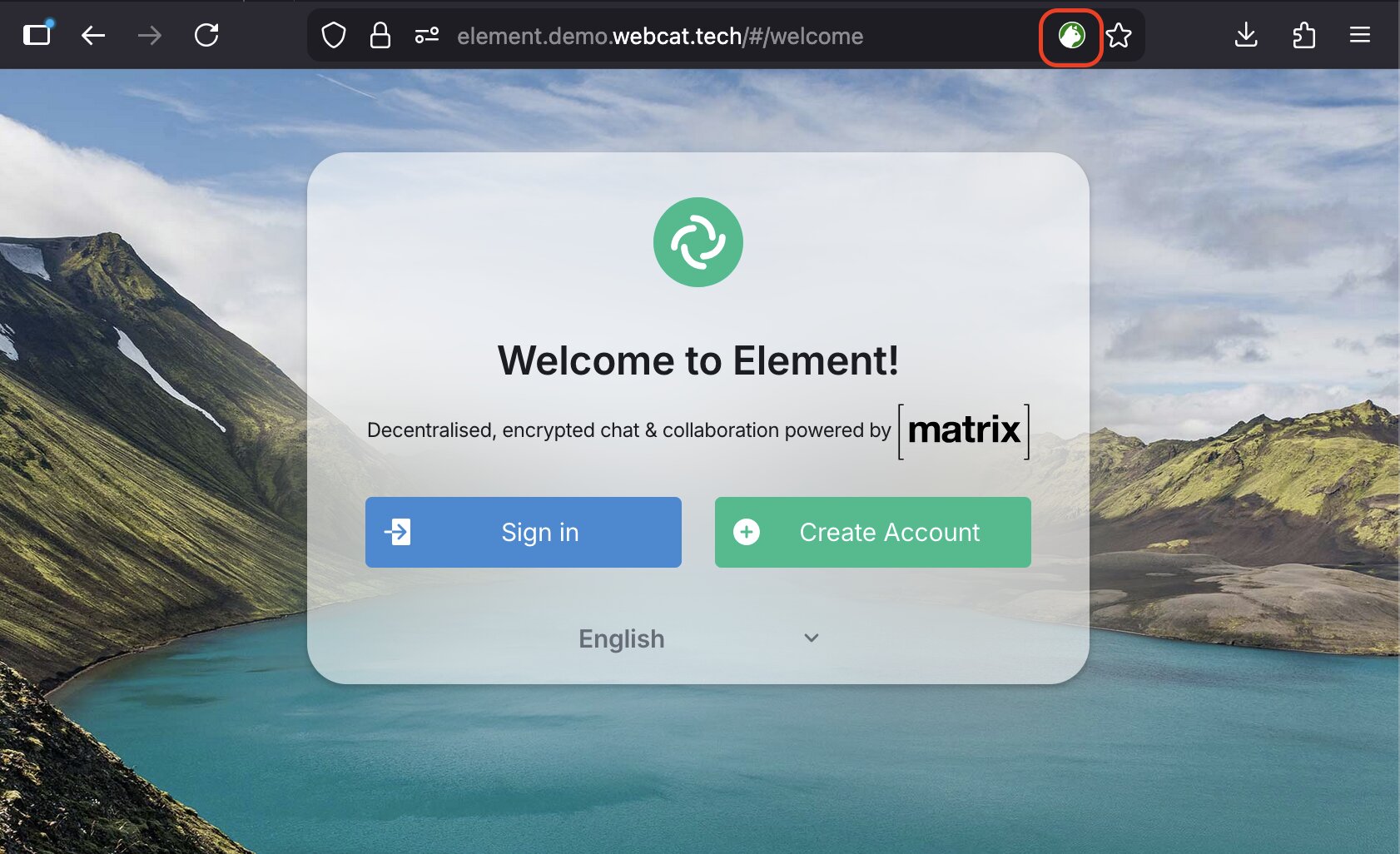
You can test the extension on the following demo websites:
Validation or integrity errors
If an integrity or validation error occurs, the user will be redirected to a dedicated error page.
The error page displays a specific error code indicating at which stage of the validation process the issue occurred.
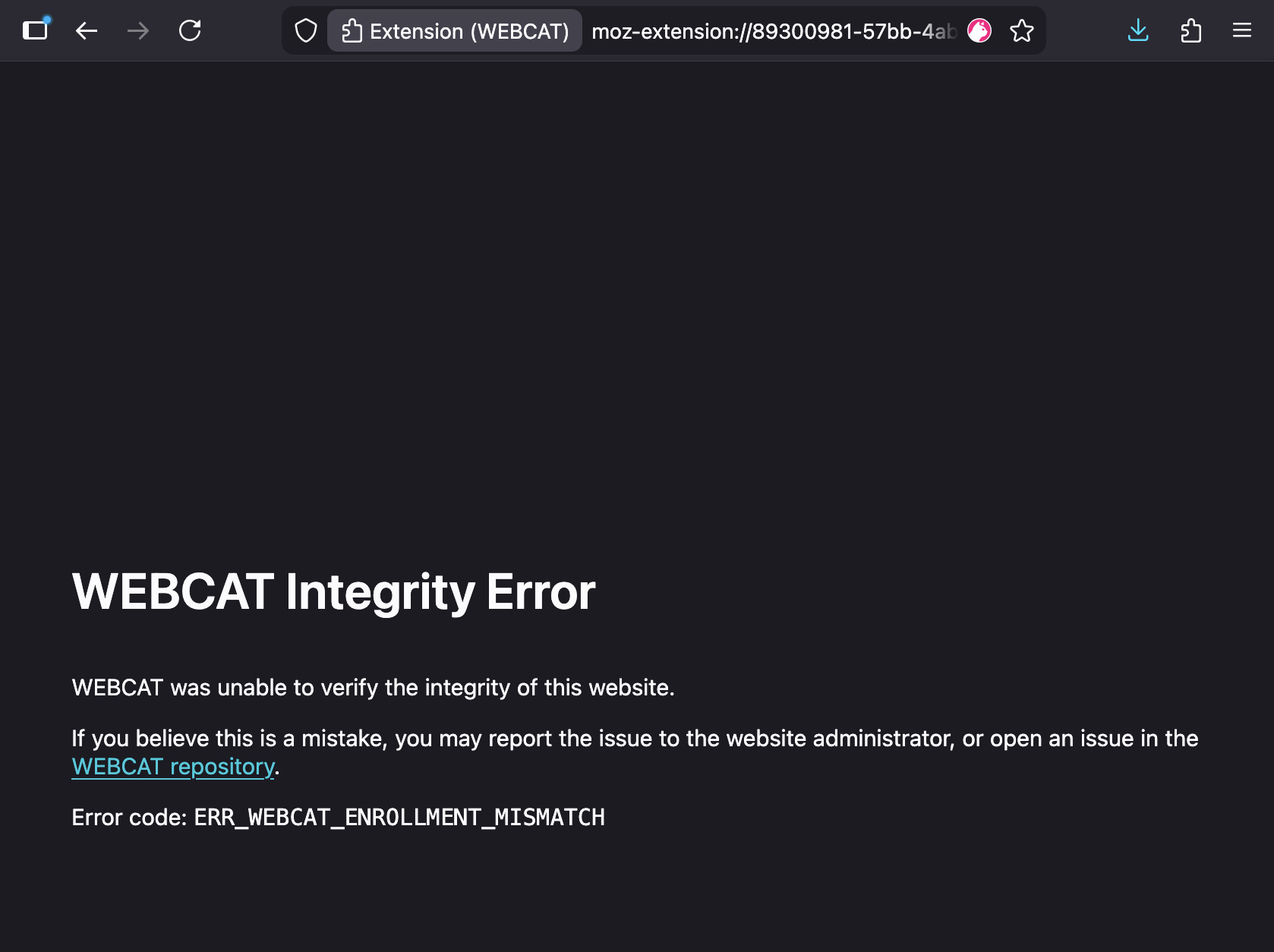
You can test various validation and integrity error cases at:
-
enrollment-error.demo.webcat.tech → Should trigger an enrollment error
-
manifest-error.demo.webcat.tech → Should trigger a manifest validation error
-
integrity-error.demo.webcat.tech → Links on the homepage should trigger file integrity errors
Error codes
Below is a reference table describing all WEBCAT error codes.
Each error code indicates the validation stage and failure reason. As an end user, you might want to report any of these errors to the website administrators, if it is safe to do so.
Fetch errors
| Error Code | Component | Description |
|---|---|---|
ERR_WEBCAT_BUNDLE_FETCH_PROMISE_MISSING | Fetch | Internal fetch promise missing when attempting to retrieve bundle data. |
ERR_WEBCAT_BUNDLE_FETCH_ERROR | Fetch | Failed to fetch required enrollment or manifest data from the website. |
Bundle errors
| Error Code | Component | Description |
|---|---|---|
ERR_WEBCAT_BUNDLE_MALFORMED | Bundle | The WEBCAT bundle structure is invalid or improperly formatted. |
ERR_WEBCAT_BUNDLE_MISSING_ENROLLMENT | Bundle | Enrollment information is missing from the bundle. |
ERR_WEBCAT_BUNDLE_MISSING_MANIFEST | Bundle | Manifest information is missing from the bundle. |
ERR_WEBCAT_BUNDLE_MISSING_SIGNATURES | Bundle | Signatures are missing from the manifest. |
Enrollment errors
| Error Code | Component | Description |
|---|---|---|
ERR_WEBCAT_ENROLLMENT_TYPE_INVALID | Enrollment | Enrollment type is invalid or unsupported. |
ERR_WEBCAT_ENROLLMENT_MISMATCH | Enrollment | Enrollment information does not match the expected value. |
ERR_WEBCAT_ENROLLMENT_POLICY_MALFORMED | Enrollment (Sigsum) | The enrollment policy is malformed. |
ERR_WEBCAT_ENROLLMENT_POLICY_LENGTH | Enrollment (Sigsum) | The enrollment policy exceeds allowed limits. |
ERR_WEBCAT_ENROLLMENT_SIGNERS_MALFORMED | Enrollment (Sigsum) | The list of signers is malformed. |
ERR_WEBCAT_ENROLLMENT_SIGNERS_EMPTY | Enrollment (Sigsum) | No valid signers are defined in the enrollment. |
ERR_WEBCAT_ENROLLMENT_SIGNERS_KEY_MALFORMED | Enrollment (Sigsum) | A signer’s public key is invalid or improperly formatted. |
ERR_WEBCAT_ENROLLMENT_THRESHOLD_MALFORMED | Enrollment (Sigsum) | The signature threshold value is malformed. |
ERR_WEBCAT_ENROLLMENT_THRESHOLD_IMPOSSIBLE | Enrollment (Sigsum) | The threshold cannot be satisfied with the given signers. |
ERR_WEBCAT_ENROLLMENT_LOGS_MALFORMED | Enrollment (Sigsum) | Transparency log configuration is malformed. |
ERR_WEBCAT_ENROLLMENT_MAX_AGE_MALFORMED | Enrollment | The max-age parameter is invalid. |
ERR_WEBCAT_ENROLLMENT_TRUSTED_ROOT_MISSING | Enrollment (Sigstore) | Trusted root information is missing. |
ERR_WEBCAT_ENROLLMENT_CLAIMS_MISSING | Enrollment (Sigstore) | Required OIDC claims are missing. |
ERR_WEBCAT_ENROLLMENT_CLAIMS_MALFORMED | Enrollment (Sigstore) | OIDC claims are malformed. |
ERR_WEBCAT_ENROLLMENT_CLAIMS_EMPTY | Enrollment (Sigstore) | No OIDC claims were provided. |
Manifest errors
| Error Code | Component | Description |
|---|---|---|
ERR_WEBCAT_MANIFEST_VERIFY_FAILED | Manifest | Manifest signature verification failed. |
ERR_WEBCAT_MANIFEST_THRESHOLD_UNSATISFIED | Manifest | Signature threshold was not satisfied. |
ERR_WEBCAT_MANIFEST_MISSING_TIMESTAMP | Manifest | Required timestamp is missing. |
ERR_WEBCAT_MANIFEST_TIMESTAMP_VERIFY_FAILED | Manifest | Timestamp verification failed. |
ERR_WEBCAT_MANIFEST_EXPIRED | Manifest | Manifest has expired based on max-age. |
ERR_WEBCAT_MANIFEST_FILES_MISSING | Manifest | Required file entries are missing. |
ERR_WEBCAT_MANIFEST_DEFAULT_INDEX_MISSING | Manifest | Default index configuration missing. |
ERR_WEBCAT_MANIFEST_DEFAULT_INDEX_MISSING_FILE | Manifest | Default index file not found in manifest. |
ERR_WEBCAT_MANIFEST_DEFAULT_FALLBACK_MISSING | Manifest | Default fallback configuration missing. |
ERR_WEBCAT_MANIFEST_DEFAULT_FALLBACK_MISSING_FILE | Manifest | Default fallback file not found in manifest. |
ERR_WEBCAT_MANIFEST_DEFAULT_CSP_MISSING | Manifest | Default Content Security Policy missing. |
ERR_WEBCAT_MANIFEST_DEFAULT_CSP_INVALID | Manifest | Default CSP is invalid. |
ERR_WEBCAT_MANIFEST_EXTRA_CSP_INVALID | Manifest | Additional CSP directive invalid. |
ERR_WEBCAT_MANIFEST_EXTRA_CSP_MALFORMED | Manifest | Additional CSP directive malformed. |
ERR_WEBCAT_MANIFEST_WASM_MISSING | Manifest | WebAssembly information missing. |
CSP errors
| Error Code | Component | Description |
|---|---|---|
ERR_WEBCAT_CSP_PARSE_FAILED | CSP | Failed to parse Content Security Policy header. |
ERR_WEBCAT_CSP_MISMATCH | CSP | CSP header does not match the manifest specification. |
Header errors
| Error Code | Component | Description |
|---|---|---|
ERR_WEBCAT_HEADERS_MISSING | Headers | Required WEBCAT headers are missing. |
ERR_WEBCAT_HEADERS_LOCATION_EXTERNAL | Headers | Redirected to an external location not allowed by policy. |
ERR_WEBCAT_HEADERS_FORBIDDEN | Headers | Forbidden header configuration detected. |
ERR_WEBCAT_HEADERS_DUPLICATE | Headers | Duplicate critical headers detected. |
ERR_WEBCAT_HEADERS_MISSING_CRITICAL | Headers | Missing required security-critical headers. |
ERR_WEBCAT_HEADERS_ENROLLMENT_MALFORMED | Headers | Enrollment header is malformed. |
URL errors
| Error Code | Component | Description |
|---|---|---|
ERR_WEBCAT_URL_UNSUPPORTED | URL | The visited URL scheme is unsupported by WEBCAT. |
File integrity errors
| Error Code | Component | Description |
|---|---|---|
ERR_WEBCAT_FILE_MISMATCH | File | A file’s hash does not match the manifest entry. |
For site operators
These are instructions for website publishers or administrators who want to enroll their domain and allow WEBCAT to verify the web assets that they publish.
Assets that WEBCAT can verify include any web apps that meet the requirements. If you are developing and hosting your own web application, you should first refer to our developer documentation, then return here when it’s time to publish. If you are hosting a third-party web application intended to be WEBCAT compliant, the third party should provide instructions; if they don’t, reach out to them to see if they are open to WEBCAT compliance. WEBCAT can also verify other static web assets or fully static websites.
We are working to make this process more clear, accessible and straightforward. We welcome feedback on the documentation, in its repo. If you are a developer or a website administrator and have issues following this process, feel free to file an issue in the extension Github repository.
Getting Started
WEBCAT needs two main configuration and metadata files for enrolling into the system and providing all the necessary information to browsers for verification: an enrollment.json and a manifest.json, which are combined into a bundle.json.
These files are produced with the webcat-cli utility. See its installation instructions to get set up with the CLI, then follow manual signing steps or the end-to-end example to get your website on WEBCAT. Or, use the provided GitHub Actions which automate this flow for Sigstore-based deployments.
Detailed enrollment, manifest, and bundle CLI references are also available.
Enrollment
The /.well-known/webcat/enrollment.json file contains information about the root of trust and how to verify it. For instance, in the case of a Sigstore-type enrollment, it records the trust material for Sigstore, and claims about provenance or identities. In the case of a Sigsum-type enrollment, it records the public keys of the authorized signers, a minimum threshold of valid signatures, and the Sigsum trust policy.
This information has to be recorded and validated in the enrollment system. WEBCAT infrastructure will provide a way to validate this information out-of-band, ensuring that even in case of server compromises, the root of trust cannot be tampered with. Once the file is at the /.well-known/webcat/enrollment.json path of the domain to be enrolled, the domain can be submitted to the following web interface:
👉 Go to the Enrollment Interface
The first decision you must make is whether to use Sigsum or Sigstore — see Choosing Sigsum or Sigstore. It is recommended to generate the enrollment.json file using either the webcat-cli or the provided GitHub Actions.
Manifest
A WEBCAT manifest describes a web application by listing its files, cryptographic hashes, CSP policies, and additional metadata useful for auditability. It has to be served at /.well-known/webcat/manifest.json.
Manifests are authenticated using either Sigsum or Sigstore signatures. The metadata required to validate these signatures is what is provided in enrollment.json.
For step-by-step instructions, follow Manual Signing or the end-to-end example.
Manual Signing
The following procedure describes how to use the WEBCAT CLI to generate enrollment and metadata information for WEBCAT. It uses Sigsum.
For full command and flag details, see the
webcat-clireference. For a condensed, copy-pasteable version of this same workflow, see the end-to-end example.
What you’ll need
You will need a web app (or static website) that meets the requirements. At a minumum, the app must contain an index page (like index.html) and an error page (like error.html).
You will need a local copy of the app. If the app is open source, have on hand the version control origin URL and the desired version tag. To complete enrollment, you must have the capacity to deploy new assets to the app.
You should know the Content Security Policy your app will use, per our CSP guide.
You must have sigsum installed.
Steps
These steps will create the manifest.json, enrollment.json, and bundle.json that the WEBCAT browser extension will use to verify your web app. At the end you will be ready to submit your web app to the WEBCAT enrollment system.
Create Sigsum Keys
Create a folder to store the keys. They should be kept secure and stored offline, as they will be used only to sign web application manifests at release time.
mkdir -p keys
sigsum-key generate -o keys/key1
sigsum-key generate -o keys/key2
Let’s save the public keys in a variable, as they will be useful in the next steps.
HEX1=$(sigsum-key to-hex -k keys/key1.pub)
HEX2=$(sigsum-key to-hex -k keys/key2.pub)
Create a Sigsum trust policy
A Sigsum trust policy specifies the transparency log to log to and verify against, as well as a witness policy to independently verify the log’s honesty. This policy uses a testing Sigsum log; at this stage we recommend not using a prod policy.
cat > trust_policy <<EOF
log 4644af2abd40f4895a003bca350f9d5912ab301a49c77f13e5b6d905c20a5fe6 https://test.sigsum.org/barreleye

witness poc.sigsum.org/nisse 1c25f8a44c635457e2e391d1efbca7d4c2951a0aef06225a881e46b98962ac6c
witness rgdd.se/poc-witness  28c92a5a3a054d317c86fc2eeb6a7ab2054d6217100d0be67ded5b74323c5806

group  demo-quorum-rule any poc.sigsum.org/nisse rgdd.se/poc-witness
quorum demo-quorum-rule
EOF
Create a WEBCAT config file
Write a webcat.config.json file. All the keys and values are required, though the wasm array and extra_csp object may be empty. The key default_csp should be set according to the CSP guide. See the webcat.config.json schema for a description of each field.
cat > webcat.config.json <<EOF
{
  "app": "https://github.com/element-hq/element-web",
  "version": "1.12.3",
  "default_csp": "default-src 'none'; style-src 'self' 'unsafe-inline'; script-src 'self' 'wasm-unsafe-eval'; img-src * blob: data:; connect-src * blob:; font-src 'self' data: ; media-src * blob: data:; child-src blob: data:; worker-src 'self'; frame-src blob: data:; form-action 'self'; manifest-src 'self'; frame-ancestors 'self'",
  "default_index": "index.html",
  "default_fallback": "/error.html",
  "wasm": [
    "8A7Ecx-qI7PnFNAOiNTRDi31wKQn06K0rm41Jv3RTvc"
  ],
  "extra_csp": {}
}
EOF
Create enrollment.json
Automatically generate the enrollment file. The CAS storage server should store immutable copies of the generated file using Content Addressable Storage, useful for auditing. Auditing and proper support for it is a work in progress, so it’s not strictly necessary now. We also use the $HEX1 and $HEX2 variables prepared before during the key generation phase. A --threshold of 1 means that only a signature from one of the two keys is required.
npx webcat enrollment create --policy-file trust_policy --threshold 1 --max-age 15552000 --cas-url https://cas.demoelement.com --signer "$HEX1" --signer "$HEX2" --output enrollment.json
Generate the unsigned manifest
Generate a manifest file to sign later. Requires in input a --directory, which is the path of the assets of the web application to sign. Remember, everything in the folder will be added to the manifest and integrity checked!
The utility supports optional multiple --exclude parameters to exclude files from the manifest but that are in the folder. The utility will automatically scan for .wasm files to hash and add to the wasm array. If you have inline WASM, not sourced from a file, or your WASM files have a different extension, you have to manually add the hashes to the wasm array in webcat.config.json in base64url format.
npx webcat manifest generate --policy-file trust_policy --config webcat.config.json --directory "/path/to/my/app" --output manifest_unsigned.json
Sign the manifest
Use the CLI and one of the keys generated at the beginning to sign the manifest, submit it to the Sigsum log, and collect the proof. In this case, the CLI will invoke one or more of the sigsum-go utilities under the hood.
npx webcat manifest sign --policy-file trust_policy -i manifest_unsigned.json -k keys/key1 -o manifest.json
Create bundle
Use the CLI to join enrollment.json and manifest.json into a single bundle.json that will then be consumed by the WEBCAT extension in users’ browser.
npx webcat bundle create --enrollment enrollment.json --manifest manifest.json --output bundle.json
Deploy
Remember to deploy:
/.well-known/webcat/enrollment.json/.well-known/webcat/manifest.json/.well-known/webcat/bundle.json
Check that the bundle verifies
Check that the manifest in a bundle is valid according to its enrollment information.
npx webcat manifest verify bundle.json
Submit for enrollment
If everything verifies, you are ready for deployment! Enroll in the WEBCAT enrollment system at enroll.webcat.tech
Github Actions
Github actions automation
Site enrollment is the process of:
-
publishing the WEBCAT artifacts that let the browser extension verify your site; and
-
keeping those artifacts current as your site evolves.
This page focuses on how to use WEBCAT-provided GitHub Actions workflows to
integrate webcat-cli with Sigstore into a static site’s CI/CD pipeline without
breaking reproducibility. The prerequisites are covered in the webcat-cli
documentation: in particular choosing between Sigstore and
Sigsum and the webcat.config.json
schema.
WEBCAT artifacts
The following files must be served from your site’s /.well-known/webcat/ path:
| File | Description |
|---|---|
enrollment.json and enrollment-prev.json | The enrollment information |
manifest.json | The manifest |
bundle.json and bundle-prev.json | The bundle |
All of these files are committed to the source repository. They are updated as part of the WEBCAT-provided GitHub Actions workflows, not regenerated from scratch on every build.
Reproducibility for static sites
WEBCAT’s GitHub Actions workflows must be integrated in a way that preserves the site’s reproducibility even when these WEBCAT-generated files have changed. Specifically, merging changes to these files:
-
MUST publish the site with these changes included, including rebuilding the site if necessary.
-
MUST NOT cause other files (i.e., outside of
.well-known/webcat/) to change. Version numbers and timestamps MUST remain unchanged. -
MUST NOT trigger a loop of updates to these files.
Common pitfalls include:
Version stamps. If CI stamps a version string (e.g., YYYY.MM.DD.HH.MM.SS)
from the current clock, a rebuild triggered by merging an updated manifest will
produce a different version string than the original build. This changes the
manifest and triggers another cycle. One solution is to derive the version from
the timestamp of the Git commit instead.
File modification times. Static-site generators that use file modification times (mtimes) will produce different output if files are checked out with the current time rather than their committed time. Clamp mtimes to a consistent timestamp (e.g., per version or per commit) across builds.
Workflow architecture
One way to satisfy these reproducibility requirements is to separate concerns across three workflows:
1. Build with WEBCAT
Triggered on push to the main branch, excluding the .well-known/webcat/
path. Builds the site, deploys it, and then calls WEBCAT’s reusable workflows to
update the manifest and the bundle.
The paths-ignore exclusion prevents an infinite loop when CI later commits the
updated manifest.
Jobs, in order:
-
Build and deploy: Build the site, deploy it to the CDN, and upload the built output and
webcat.config.jsonas artifacts for the next step. -
Generate manifest: Generate and sign a new
manifest.json(in a new pull request for review). -
Assemble bundle: Combine the manifest and Sigstore enrollment into
bundle.json(in a new pull request for review).
2. Publish
Triggered on push to the main branch, only for the .well-known/webcat/
path. Rebuilds and redeploys the site so that the newly committed manifests are
served from the CDN.
This workflow must not upload artifacts or trigger the WEBCAT manifest-generation steps.
3. Enrollment sync
Triggered on a daily schedule (and manually via workflow_dispatch). Fetches
the latest Sigstore trusted-root from the upstream WEBCAT CLI repository and
opens a pull request if it differs from the current enrollment.json.
Merging the resulting pull request triggers the Publish workflow, which redeploys with the updated enrollment files.
Note
bundle.jsonMUST be regenerated whenever eithermanifest.jsonorenrollment.jsonhas changed. Ifenrollment.jsonhas changed, you may have to manually trigger an update tomanifest.jsonfor the combinedbundle.jsonto pick up the changes.
HTTP header alignment
The Content-Security-Policy header set by your CDN or HTTP server must exactly
match the default_csp (and any extra_csp entries) in the WEBCAT
configuration.
Initial setup
Before manifests can be generated automatically in CI, the following must be in place:
-
Grant workflow permissions. The CI jobs that open pull requests require write permissions. In GitHub, this is Settings → Actions → General → Workflow permissions → Read and write permissions.
-
Configure WEBCAT. Commit a
webcat.config.jsonwith theappURL,default_csp, and other fields. Push. -
Create
enrollment.json. Run the enrollment-sync workflow manually (via the GitHub Actionsworkflow_dispatchtrigger). Review and merge the pull request it opens. -
Trigger the first build. Push a content change (outside of
.well-known/webcat/) to start the build-with-WEBCAT workflow. The manifest and bundle will follow automatically in new pull requests.
Worked example
The following sections illustrate the approach outlined above for a static site built with ikiwiki and deployed to static hosting. Here we use Cloudflare Pages; the Cloudflare-side configuration is not covered.
Repository layout
.
├── ikiwiki.setup                     # ikiwiki configuration
├── webcat.config.json                # WEBCAT configuration
├── src/                              # ikiwiki source (srcdir)
│   ├── .well-known/webcat/           # WEBCAT artifacts (committed from steps 3 and 4 above)
│   │   ├── enrollment.json
│   │   ├── enrollment-prev.json
│   │   ├── bundle.json
│   │   ├── bundle-prev.json
│   │   └── manifest.json
│   ├── _headers                      # Cloudflare Pages HTTP headers
│   └── …                             # site content
└── .github/workflows/
    ├── ikiwiki-with-manifest.yaml    # See section: "'Build with WEBCAT' Workflow"
    ├── build-and-deploy.yaml         # See section: "Reusable Build-and-Deploy Job"
    ├── deploy.yaml                   # See section: "Publishing Workflow"
    └── sync-sigstore-enrollment.yml  # See section: "Enrollment-sync Workflow"
ikiwiki writes the built site to dist/. In addition, in ikiwiki.setup,
include: ^\.well-known overrides ikiwiki’s default behavior of skipping
dot-directories, so that .well-known/ is included in the built
site.
“Build with WEBCAT” workflow
# .github/workflows/ikiwiki-with-manifest.yaml
name: Update WEBCAT Manifest

on:
  push:
    branches: [main]
    paths-ignore: ["src/.well-known/webcat/**"]
  workflow_dispatch:

jobs:
  build:
    uses: ./.github/workflows/build-and-deploy.yaml
    with:
      upload_webcat_artifacts: true
    secrets: inherit

  webcat-manifest:
    needs: build
    permissions:
      contents: write
      pull-requests: write
      id-token: write
    uses: freedomofpress/webcat-cli/.github/workflows/webcat-generate-and-commit-manifest.yml@main
    with:
      manifest_path: src/.well-known/webcat/manifest.json

  webcat-bundle:
    needs: webcat-manifest
    permissions:
      contents: write
    uses: freedomofpress/webcat-cli/.github/workflows/webcat-assemble-bundle.yaml@main
    with:
      enrollment_path: src/.well-known/webcat/enrollment.json
      manifest_path: src/.well-known/webcat/manifest.json
      bundle_path: src/.well-known/webcat/bundle.json
Reusable build-and-deploy job
# .github/workflows/build-and-deploy.yaml
name: Build and Deploy

on:
  workflow_call:
    inputs:
      upload_webcat_artifacts:
        type: boolean
        required: false
        default: false

env:
  DIST: dist

jobs:
  build-and-deploy:
    runs-on: ubuntu-latest
    steps:
      - uses: actions/checkout@v4
        with:
          fetch-depth: 0 # full history needed for --gettime and mtime restoration

      - name: Set Git identity
        run: |
          git config user.name "$GITHUB_ACTOR"
          git config user.email "<>"

      - name: Install ikiwiki and supporting tools
        run: |
          sudo apt-get update
          sudo apt-get install --quiet --yes ikiwiki

      - name: Get submodules
        run: git submodule update --init

      - name: Restore mtimes
        run: share/git-tools/git-restore-mtime

      - name: Build site
        run: ikiwiki --gettime --setup ikiwiki.setup

      - name: Duplicate index as error page
        working-directory: ${{ env.DIST }}
        run: cp index.html 404.html

      - name: Stamp version
        if: inputs.upload_webcat_artifacts
        run: |
          VERSION="$(TZ=UTC git log -1 --format=%cd --date=format-local:'%Y.%m.%d.%H.%M.%S')"
          jq --arg v "$VERSION" '.version = $v' webcat.config.json > webcat.config.json.tmp
          mv webcat.config.json.tmp webcat.config.json

      - name: Deploy to Cloudflare Pages
        uses: cloudflare/wrangler-action@v3
        with:
          apiToken: ${{ secrets.CLOUDFLARE_API_TOKEN }}
          accountId: ${{ vars.CLOUDFLARE_ACCOUNT_ID }}
          command: pages deploy ${{ env.DIST }} --project-name=${{ vars.CLOUDFLARE_PAGES_PROJECT }}

      - name: Upload dist artifact
        if: inputs.upload_webcat_artifacts
        uses: actions/upload-artifact@v4
        with:
          name: webcat-dist
          path: dist

      - name: Upload WEBCAT config
        if: inputs.upload_webcat_artifacts
        uses: actions/upload-artifact@v4
        with:
          name: webcat-config
          path: webcat.config.json
The version is derived from git log -1 --format=%cd (the commit timestamp)
rather than date -u, so that rebuilding from the same commit always produces
the same version string.
As discussed above, mtime restoration is necessary because the Git working tree
will have all mtimes set to the checkout time. Clamping them to their
last-commit time (via git-restore-mtime from git-tools) makes the build
reproducible.
Publishing workflow
# .github/workflows/deploy.yaml
name: Deploy to Cloudflare Pages

on:
  push:
    branches: [main]
    paths: ["src/.well-known/webcat/**"]

jobs:
  deploy:
    uses: ./.github/workflows/build-and-deploy.yaml
    secrets: inherit
Enrollment-sync workflow
# .github/workflows/sync-sigstore-enrollment.yaml
name: Sync Sigstore Enrollment

on:
  schedule:
    - cron: "0 3 * * *" # daily at 03:00 UTC
  workflow_dispatch:

jobs:
  sync:
    permissions:
      contents: write
      pull-requests: write
    uses: freedomofpress/webcat-cli/.github/workflows/sigstore-enrollment-sync.yml@main
    with:
      source-repository-uri: "https://github.com/${{ github.repository }}"
      source-repository-ref: "${{ github.ref }}"
      max_age: "15552000"
      enrollment_path: src/.well-known/webcat/enrollment.json
      enrollment_prev_path: src/.well-known/webcat/enrollment-prev.json
      bundle_path: src/.well-known/webcat/bundle.json
      bundle_prev_path: src/.well-known/webcat/bundle-prev.json

  webcat-bundle:
    needs: sync
    permissions:
      contents: write

    uses: freedomofpress/webcat-cli/.github/workflows/webcat-assemble-bundle.yaml@main
    with:
      enrollment_path: src/.well-known/webcat/enrollment.json
      manifest_path: src/.well-known/webcat/manifest.json
      bundle_path: src/.well-known/webcat/bundle.json
WEBCAT CLI
The CLI contains utilities for creating, validating, and packaging WEBCAT enrollments and manifests. It can be used to quickly integrate and enroll a web application or domain into WEBCAT.
The CLI code repository also contains GitHub Actions which automate the use of the CLI.
Quick Start
If you are a website operator or publisher, here is how you can use the CLI to get your website onto WEBCAT:
- Choose Sigsum or Sigstore for enrollment.
- Install the CLI.
- Produce WEBCAT artifacts by following the manual signing steps.
- (Or, use the end-to-end example example of those steps, or the the GitHub Actions automation of those steps.)
- Refer to
webcat.config.jsonwhen creating your configuration file.
If you are also the developer of the web app you will be publishing, you must first prepare your web application so it is compatible with WEBCAT.
Choosing Sigsum or Sigstore
A WEBCAT manifest describes a web application by listing its files, cryptographic hashes, CSP policies, and additional metadata useful for auditability. But how is this information verified?
Manifests are authenticated using either Sigsum or Sigstore signatures. The metadata required to validate these signatures or attestations must be registered beforehand with WEBCAT’s distributed validation system.
Changes to enrollment information are:
- Transparently logged
- Auditable
- Subject to a delay (cool-down window)
Keep this in mind: if you make a mistake, you may need to wait before updating the enrollment again.
The first decision you must make is whether to use Sigsum or Sigstore.
Choosing Sigsum
Sigsum, developed by Glasklar Teknik, provides:
- Compact Ed25519 signatures
- Easy offline signing
- Threshold signing support in WEBCAT
You can choose among multiple transparency logs and witness policies, or even run your own witness if you want to define your own trust roots.
Sigsum is generally the better choice if:
- You want offline, manual signing
- You do not want to depend on GitHub or other centralized infrastructure
However, due to current tooling limitations, Sigsum is less convenient for fully automated deployment workflows.
To learn more about Sigsum and how to write a policy, see Sigsum’s Getting Started guide.
Choosing Sigstore
If you choose Sigstore, WEBCAT provides GitHub Actions that support automated deployments (see GitHub Actions).
Warning: Sigstore support is still a work in progress. Claim-based enrollment constraints are supported.
In theory, WEBCAT also supports a bring-your-own Sigstore deployment. This is not documented here due to its complexity. This guide assumes you are using the Sigstore Public Good instance, the same one used by GitHub and public container registries.
The Sigstore workflow consists of two actions:
-
Enrollment Update Action - Source / Example usage
- Fetches the latest trust material using TUF
- Updates enrollment information if changes are detected
- Submits the updated enrollment for re-evaluation by the distributed system (This submission step will soon be integrated directly into the CLI.)
Caution: Sigstore enrollments support claim-based constraints using certificate extension OIDs.
-
Manifest Update Action - Example Usage
- Generates, signs, and bundles a WEBCAT manifest
See the webcat-demo-test repository for a complete, end-to-end example of this flow. Note: due to how Sigstore is claimed in the GitHub Action, this has to be copied into the target repository and should not be invoked directly from the webcat-cli one.
Installation
Requirements
- Node.js 20 or newer.
sigsum-submitmust be available on your$PATHformanifest signoperations. (See Installing the CLI below.)- A Sigsum trust policy and keypair for signing manifests.
- An OIDC identity token in the environment (CI-supported) or interactive login for
manifest sign --type sigstore.
Installing the CLI
npm install @freedomofpress/webcat-cli
To run the installed CLI:
npx webcat --help
Sigsum needs to be installed separately, as it currently is only available in Go binaries. Install Go if needed, then:
go install sigsum.org/sigsum-go/cmd/sigsum-key@latest
go install sigsum.org/sigsum-go/cmd/sigsum-submit@latest
By default, these binaries will be available in $HOME/go/bin.
Using the CLI
Once installed, you can use the CLI and sigsum for manual signing of your web assets manifest.
Or, to learn more details on the sub-commands within the CLI, check the enrollment, mainfest, and bundle command references.
Enrollment Commands
The enrollment namespace manages Sigsum or Sigstore enrollment payloads. Sigsum enrollments
are the default; use --type sigstore along with Sigstore claim constraints (--claim
and/or compatibility flags --issuer + --identity) and either --trusted-root or
--community-trusted-root to build Sigstore enrollments.
| Command | Purpose |
|---|---|
enrollment create | Compile a Sigsum policy file and create a normalized enrollment JSON document. |
enrollment canonicalize | Canonicalize an enrollment JSON document using canonical JSON rules. |
enrollment hash | Canonicalize and SHA-256 hash an enrollment, outputting a base64url digest. |
Example – hash the sample enrollment definition:
npx webcat enrollment hash -i examples/enrollment.json
# => TSNydkDZBv6QNZ3m7ZuBP9fFj0TD6hHDmzcwu9ulK3A
The canonicalized document (useful for audits) can be produced with:
npx webcat enrollment canonicalize -i examples/enrollment.json
Sigstore enrollment example with claims (legacy --identity and --issuer are mapped to claims):
npx webcat enrollment create \
  --type sigstore \
  --community-trusted-root \
  --identity alice@example.com \
  --issuer https://token.actions.githubusercontent.com \
  --build-signer-uri https://github.com/acme/repo/.github/workflows/release.yml@refs/heads/main \
  --claim 1.3.6.1.4.1.57264.1.11=platform-hosted \
  --max-age 3600
Manifest Commands
The manifest namespace operates on WEBCAT manifests:
| Command | Purpose |
|---|---|
manifest generate | Scan a directory of static assets, apply a manifest config, and embed a timestamp for --type sigsum (Sigsum log); sigstore manifests omit timestamps. |
manifest sign | Sign a manifest with Sigsum (default) or Sigstore and attach proofs/bundles. |
manifest canonicalize | Canonicalize an existing manifest JSON document. |
manifest hash | Canonicalize and SHA-256 hash a manifest, outputting a base64url digest. |
manifest verify | Verify signatures in a manifest (or bundle) against an enrollment and print the policy hash. |
manifest generate skips dotfiles and dotfolders by default; pass --include-dotfiles to include them. Use
--exclude <path> (repeatable) to omit specific files or directories from the scan.
Example – hash the provided manifest:
npx webcat manifest hash -i examples/manifest.json
# => 8OYr4SFw2U2NR2efE69FAKZicf_2QbUGxXT7kxN1C80
Example – verify a bundle:
npx webcat manifest verify examples/bundle.json
Sigstore signing
Sigstore signing defaults to the community Fulcio/Rekor services. You can override the
endpoints with --fulcio-url, --rekor-url, and --tsa-url when signing.
To sign with Sigstore using an ambient OIDC token (for example, in CI):
npx webcat manifest sign \
  --type sigstore \
  --input manifest.json
If you already have an OIDC ID token, you can pass it explicitly:
npx webcat manifest sign \
  --type sigstore \
  --input manifest.json \
  --oidc-token "$OIDC_ID_TOKEN"
To perform an interactive device authorization flow (opens a browser and prompts for a code):
npx webcat manifest sign \
  --type sigstore \
  --input manifest.json \
  --interactive
To use custom Sigstore infrastructure:
npx webcat manifest sign \
  --type sigstore \
  --input manifest.json \
  --fulcio-url https://fulcio.example.com \
  --rekor-url https://rekor.example.com \
  --tsa-url https://tsa.example.com \
  --oidc-issuer https://oauth2.example.com/auth \
  --oidc-client-id example-client \
  --interactive
Bundle Commands
Use bundle create to combine an enrollment and a manifest (with signatures) into a WEBCAT bundle that can be distributed to verifiers:
npx webcat bundle create -e examples/enrollment.json -m examples/manifest.json > bundle.json
The resulting bundle.json matches the fixture located in examples/bundle.json.
End-to-End Example
This example walks through the full Sigsum signing workflow with the CLI. If you are using Sigstore instead, you generally do not run these steps manually — see GitHub Actions.
The webcat-cli repository includes demo.sh, which exercises the full workflow. The commands
below mirror that script so you can quickly test the CLI end to end:
# 1) Prepare demo keys
mkdir -p keys
sigsum-key generate -o keys/key1
sigsum-key generate -o keys/key2
HEX1=$(sigsum-key to-hex -k keys/key1.pub)
HEX2=$(sigsum-key to-hex -k keys/key2.pub)

# 2) Create trust policy and app config
cat > trust_policy <<'EOF'
log 4644af2abd40f4895a003bca350f9d5912ab301a49c77f13e5b6d905c20a5fe6 https://test.sigsum.org/barreleye
witness poc.sigsum.org/nisse 1c25f8a44c635457e2e391d1efbca7d4c2951a0aef06225a881e46b98962ac6c
witness rgdd.se/poc-witness  28c92a5a3a054d317c86fc2eeb6a7ab2054d6217100d0be67ded5b74323c5806
group  demo-quorum-rule any poc.sigsum.org/nisse rgdd.se/poc-witness
quorum demo-quorum-rule
EOF

cat > webcat.config.json <<'EOF'
{
  "app": "https://github.com/element-hq/element-web",
  "version": "1.12.3",
  "default_csp": "default-src 'none'; style-src 'self' 'unsafe-inline'; script-src 'self' 'wasm-unsafe-eval'; img-src * blob: data:; connect-src * blob:; font-src 'self' data: ; media-src * blob: data:; child-src blob: data:; worker-src 'self'; frame-src blob: data:; form-action 'self'; manifest-src 'self'; frame-ancestors 'self'",
  "default_index": "index.html",
  "default_fallback": "/error.html",
  "wasm": ["8A7Ecx-qI7PnFNAOiNTRDi31wKQn06K0rm41Jv3RTvc"],
  "extra_csp": {}
}
EOF

# 3) Produce enrollment and manifest
TMPDIR=$(mktemp -d)
echo index > "$TMPDIR/index.html"
echo error > "$TMPDIR/error.html"

npx webcat enrollment create \
  --policy-file trust_policy \
  --threshold 1 \
  --max-age 15552000 \
  --cas-url https://cas.demoelement.com \
  --signer "$HEX1" \
  --signer "$HEX2" \
  --output enrollment.json

npx webcat manifest generate \
  --policy-file trust_policy \
  --config webcat.config.json \
  --directory "$TMPDIR" \
  --output manifest_unsigned.json

npx webcat manifest sign \
  --policy-file trust_policy \
  -i manifest_unsigned.json \
  -k keys/key1 \
  -o manifest.json

# 4) Bundle and verify
npx webcat bundle create \
  --enrollment enrollment.json \
  --manifest manifest.json \
  --output bundle.json
npx webcat manifest verify bundle.json
The script prints intermediate JSON artifacts with jq so you can inspect the
resulting enrollment, manifest, and bundle.
webcat.config.json Schema
The manifest generator expects a Webcat config file (commonly webcat.config.json
or a JSON equivalent) matching the schema below:
| Field | Type | Description |
|---|---|---|
app | string | For open source apps, origin URL of the application being packaged. This is metadata; the format is not validated. |
version | string | Git tag to be used for reproducibility and auditing. |
default_csp | string | Base Content-Security-Policy applied to all assets; see the CSP guide. |
default_index | string | Default index file served when a directory is requested; leading / is stripped automatically. |
default_fallback | string | Absolute path served when a file is missing; must begin with /. |
wasm | string[] | List (may be empty) of base64url SHA-256 digests for inline WebAssembly modules. .wasm files are added automatically during generation. |
extra_csp | Record<string, string> | Per-path CSP overrides. Keys must start with /. Example: { "/app": "default-src 'none'" }. May be empty ({}). |
Use the JSON example in the end-to-end example as a starting point and adjust fields to match your application.
For web application developers
This section contains information useful for developers who want to ensure compatibility of their web application with WEBCAT.
We are working to make this process more clear, accessible and straightforward. We welcome feedback on the documentation, in its repo. If you are a developer or a website administrator and have issues following this process, feel free to file an issue in the extension Github repository.
You may find it useful to first understand some concepts outlined in the Glossary section.
Next, read WEBCAT’s Requirements.
Requirements
To operate correctly, a web application MUST satisfy a small set of constraints designed to provide security, consistency, and auditability. These constraints ensure that WEBCAT can reliably reason about what code is executed in the browser and how it evolves over time. For a more detailed discussion of the design rationale, see this blog post.
Staticness
All assets that constitute the logic and user interface of the web application MUST be known and fixed at signing time. Server-generated HTML, scripts, or stylesheets are not supported. This includes, for example, mixed PHP/HTML pages, server-side templating systems, and Server-Side Includes (SSI).
WEBCAT can validate the integrity of any asset type, but it enforces integrity strictly only for HTML, JavaScript, and CSS. For other asset types, integrity verification depends on whether a corresponding path is explicitly listed in the manifest.
This enables a clear separation between:
- Application assets, such as UI images or static translation files, which can be included in the manifest and verified, and
- Data assets, such as user-generated or server-generated content (e.g., avatars or API responses), which SHOULD NOT be included.
For example, JSON files containing static application strings (such as translations) may be listed in the manifest, while REST API endpoints returning dynamic application data should not.
Auditability and commitment
Any asset subject to integrity verification MUST NOT be able to execute code that was not included at manifest generation and signing time. As a result, dynamic code execution mechanisms, such as eval() or instantiating Workers from blob: URLs, are disallowed.
WEBCAT enforces this primarily at the Content Security Policy (CSP) level. For example, CSPs that permit unsafe-eval or allow script sources that are not enrolled in WEBCAT are rejected.
This constraint introduces some trade-offs. It disallows certain common patterns and makes it difficult to integrate third-party JavaScript that is dynamically served or heavily obfuscated, such as anti-spam or DDoS protection pages, or opaque scripts like Google or Cloudflare CAPTCHA.
While it is theoretically possible to download such scripts and include them as static application assets, doing so is fragile: the upstream code may change at any time, breaking functionality, and it may not be compatible with the CSP restrictions required by WEBCAT. Moreover, including large, opaque, and obfuscated code blobs undermines WEBCAT’s auditability and monitoring goals.
HTTP server headers restriction
Some HTTP headers can influence the execution environment of a webpage, and as such, they might be limited.
- Location header is limited at relative redirect. It supports only redirects starting with
/,./and../. - Refresh header is blocked.
- Link header is blocked.
Minimum app contents
In order for a site operator to use the WEBCAT CLI with the app, at a minimum it must contain a static index page (like index.html) and an error page (like error.html).
CSP
WEBCAT verifies that everything a page executes is covered by the signed manifest. The Content Security Policy enforces this at runtime: it prevents the page from loading scripts that are not in the manifest, from executing code generated at runtime with eval(), and from starting workers from blob: or data: URLs. WEBCAT therefore restricts which policies a manifest may declare and verifies that the server sends them.
The authoritative list of rules is the CSP section of the specification. This page describes how the rules are applied and how to write a compliant policy.
How WEBCAT applies your policy
A manifest contains one mandatory policy, default_csp, and optionally a map of path-specific policies, extra_csp. Both are configured in webcat.config.json (see the schema).
At manifest load. Every policy in the manifest is validated against the rules below. A policy that violates a rule invalidates the entire manifest and the site does not load. The error page shows ERR_WEBCAT_MANIFEST_DEFAULT_CSP_INVALID or ERR_WEBCAT_MANIFEST_EXTRA_CSP_INVALID, or ERR_WEBCAT_MANIFEST_EXTRA_CSP_MALFORMED if extra_csp is not an object mapping paths to strings.
On every response. Each response from the enrolled origin must carry a Content-Security-Policy header that matches the manifest policy for its path character for character. Whitespace, directive ordering and quoting are all significant. A different header gives ERR_WEBCAT_CSP_MISMATCH; a missing header gives ERR_WEBCAT_HEADERS_MISSING_CRITICAL. Responses served from the browser cache are exempt from the header check because Firefox does not always expose their headers to extensions. The browser still enforces the policy on them.
Send a single policy. Manifest policies must not contain commas. If an intermediary, for example a browser extension such as NoScript, appends a further policy to the header, WEBCAT compares only the first policy. The browser enforces all of them.
Which policy applies to a path. WEBCAT looks for the request path as an exact key in extra_csp, then for the longest extra_csp key that is a prefix of the path, and falls back to default_csp. A request for / is matched as default_index. Keys in extra_csp are plain string prefixes: "/admin" also covers /admin-help.html, so terminate keys with / to denote a directory.
Restrictions
Hash source expressions ('sha256-<digest>', 'sha384-<digest>', 'sha512-<digest>') are accepted where listed below. Nonces ('nonce-<value>') are never accepted, because their value cannot be covered by the manifest signature. Multiple Content-Security-Policy headers and comma-separated policy lists are not accepted in the manifest.
default-src
The only allowed source expressions are:
'self''none'
If the value of the default-src directive is not 'none', it is required to specify script-src, style-src, object-src and worker-src. A default-src whose source list contains 'none' but also other source expressions is not treated as 'none' (See #99).
script-src, script-src-elem
The only allowed source expressions are:
'none''self''wasm-unsafe-eval''sha256-<digest>''sha384-<digest>''sha512-<digest>'
All scripts must either be served from the enrolled origin, and thus be covered by the manifest, or be inlined with a hash. Loading scripts from other origins, even enrolled ones, is not supported. 'wasm-unsafe-eval' is allowed because WebAssembly bytecode is verified separately against the wasm hashes in the manifest. script-src-elem is required only if script-src is absent and default-src is not 'none'.
style-src, style-src-elem
The only allowed source expressions are:
'none''self''sha256-<digest>''sha384-<digest>''sha512-<digest>''unsafe-inline'*'unsafe-hashes'*
* These source expressions are currently allowed because all tested applications rely on them. However, when developing or updating an application, it is recommended to avoid using them whenever possible. The long-term goal is to phase out support for these source expressions to improve forward compatibility and tighten policy guarantees.
style-src-elem is required only if style-src is absent and default-src is not 'none'.
object-src
The only allowed source expressions are:
'none'
The value must be 'none' if default-src is not 'none', otherwise it may be omitted.
frame-src, child-src
These directives are not restricted. Any value is accepted, and they may be omitted.
WEBCAT adds the Origin-Agent-Cluster: ?1 header to every enrolled document. This requests origin-keyed agent clustering, so frames are isolated from the embedding document by origin even when they belong to the same site.
A framed origin that is enrolled is verified under its own manifest. A framed origin that is not enrolled is not verified.
Do not send an Origin-Agent-Cluster header with a value other than ?1 for enrolled documents. Such responses are blocked.
Set the sandbox attribute on frames that embed unverified content, such as CAPTCHAs, third-party players or payment widgets. Grant only the flags required, for example sandbox="allow-scripts", and never allow-same-origin for content you do not control. Exchange data with frames through postMessage and verify the origin of every message.
worker-src
The only allowed source expressions are:
'none''self'
The worker-src directive must be set if default-src is not 'none', otherwise it can be omitted. Setting it explicitly is recommended in all cases, because browsers fall back to child-src, which is unrestricted, when it is absent.
Everything else (img-src, connect-src, etc.)
Other directives do not currently have limitations.
Writing a policy
Start from default-src 'none' and add only the sources the application requires. A typical policy for a single-page application:
default-src 'none'; script-src 'self' 'wasm-unsafe-eval'; style-src 'self'; object-src 'none'; worker-src 'self'; img-src 'self' blob: data:; font-src 'self'; connect-src 'self'; frame-ancestors 'self'
Directive by directive:
default-src 'none': no resource loads unless a more specific directive permits it.script-src 'self' 'wasm-unsafe-eval': scripts only from the enrolled origin, which the manifest covers; omit'wasm-unsafe-eval'if the application does not use WebAssembly.style-src 'self': stylesheets only from the enrolled origin. Add'unsafe-inline'only if the framework injects inline styles that cannot be avoided.object-src 'none': disables plugins. Required wheneverdefault-srcis not'none'. Stating it in all cases is harmless.worker-src 'self': workers only from the enrolled origin, where their scripts are verified like any other script.img-src,font-src,connect-src: not restricted by WEBCAT. Limit them to the sources the application uses.connect-srcdetermines which API endpoints the application can call.frame-ancestors 'self': not restricted by WEBCAT, but prevents other sites from framing the application.
Then:
- Use the identical string in
webcat.config.jsonand in the server or CDN configuration. Generating one from the other avoids transcription errors. - Verify that no intermediary between the origin server and the browser rewrites the header. Some CDNs and security proxies append or reorder directives, which changes the string and fails the match.
- Use
extra_csponly when a path requires a different policy. Every entry is validated against the same rules and cannot be used to relax them.
Setting the header
Every response from the enrolled origin must carry the header, including error pages and static assets. Set it at the server or hosting platform level rather than per page.
GitHub Pages does not support custom response headers, so a site hosted there cannot send a CSP and cannot be enrolled. Either proxy the site through Cloudflare and set the header there, or use a different host.
Cloudflare Pages: add a _headers file to the build output directory. Per-path rules map directly to extra_csp entries. Instructions.
/*
  Content-Security-Policy: default-src 'none'; script-src 'self' 'wasm-unsafe-eval'; style-src 'self'; object-src 'none'; worker-src 'self'; img-src 'self' blob: data:; font-src 'self'; connect-src 'self'; frame-ancestors 'self'
Cloudflare (proxied sites): for any origin behind the Cloudflare proxy, including GitHub Pages, add a response header transform rule that sets Content-Security-Policy. Instructions.
Netlify: same _headers file format, or a [[headers]] block in netlify.toml. Instructions.
Vercel: a headers array in vercel.json. Instructions. See the Tinfoil deployment in Examples for a working setup.
nginx: in the server block. always includes error responses. An add_header inside a location block replaces all inherited ones, so repeat the directive there. Instructions.
add_header Content-Security-Policy "default-src 'none'; script-src 'self'; ..." always;
Apache: with mod_headers, in the virtual host or .htaccess. always includes error responses. Instructions.
Header always set Content-Security-Policy "default-src 'none'; script-src 'self'; ..."
Caddy: a header directive in the site block. Instructions.
header Content-Security-Policy "default-src 'none'; script-src 'self'; ..."
Traefik: a headers middleware attached to the router. Instructions.
http:
  middlewares:
    webcat-csp:
      headers:
        contentSecurityPolicy: "default-src 'none'; script-src 'self'; ..."
Verify the served header against the configuration file before enrolling:
curl -sI https://example.com/ | grep -i content-security-policy
Common rejections
| Error code | Usual cause |
|---|---|
ERR_WEBCAT_MANIFEST_DEFAULT_CSP_INVALID | A nonce, 'unsafe-eval', 'unsafe-inline' or 'strict-dynamic' in script-src; a host in script-src; default-src 'self' without script-src, style-src, object-src and worker-src; a comma in the policy. |
ERR_WEBCAT_MANIFEST_EXTRA_CSP_INVALID | The same, in one of the extra_csp entries. |
ERR_WEBCAT_MANIFEST_EXTRA_CSP_MALFORMED | extra_csp is not an object whose keys are paths and values are strings. |
ERR_WEBCAT_CSP_MISMATCH | The served header differs from the manifest policy: different whitespace or ordering, a CDN that edits the header, or a path that matched a different extra_csp prefix than intended. |
ERR_WEBCAT_HEADERS_MISSING_CRITICAL | The response has no Content-Security-Policy header. |
The full list of error codes is in the user documentation.
Prepare the web application for compatibility
Before anything else, you should evaluate whether your website or web application is compatible with WEBCAT. There are a few strict requirements:
- The frontend must be fully static (i.e., no server-generated HTML, JavaScript, or CSS).
- No inline JavaScript is allowed.
- A Content Security Policy (CSP) must be provided via an HTTP header and must satisfy specific constraints (see: CSP Guide, explanation blog post).
See the following examples and porting guides (outdated):
At the end, you should have compiled a webcat.config.json base file for your use case.
Examples
We have tentatively ported a few selected open-source web application to prove their potential compatibility with WEBCAT. No official support is provided. As such, administrators are discouraged from deploying these applications without prior testing and understanding that updates might break compatibility or require significant additional work.
Test app
If you are porting your own application, start with Prepare the web application for compatibility.
Test App
The demo app showcases a simple static page using WebAssembly and different types of workers. The page verifies all its assets, including fonts.
Element
Element is the well-known web-based Matrix client. It is natively compatible with WEBCAT, requiring no modification to its source code or build process. Once built, it can be signed directly using WEBCAT CLI and the sample webcat.config.json config file.
Tinfoil Verification Center
The Tinfoil.sh Verification Center is an embeddable iframe with the goal of verifying confidential computing attestations and attributes for the Tinfoil stack. It is a Next.js static web application hosted directly on Vercel. The workflow describes the steps required to deploy WEBCAT in this setup. The Verification Center is currently loaded as an iframe in production at chat.tinfoil.sh.
Architecture
This section describes WEBCAT’s system design and infrastructure.
We are currently writing this section and only the Enrollment Infrastructure is documented. In the meantime, we suggest looking also at the Research section for additional resources and useful background.
Overview

Components
- Enrollment Infrastructure - WEBCAT enrollment infrastructure chain design
Enrollment Infrastructure
The WEBCAT enrollment infrastructure is a distributed system, designed to reduce censorship risks and avoid single points of trust or failure.
Also see a specification of the full process here.
For sequence diagrams of the enrollment flow and oracle/validator communication, see webcat-infra-chain docs.
In this section
- Key Entities and Behaviors — Overall flow
- Censorship — Anti-censorship considerations
- Transparency — Transparency logging, monitoring, and auditing
- Enrollment Preload List — How the list is extracted and verified by the extension
Key Entities and Behaviors
The chain consists of a number of nodes, each of whom may or may not be a consensus validator. Every node has a consensus key, but only some have non-zero voting power, designated by the application. Those nodes with non-zero voting power are called validators. Every node, regardless of whether it is a validator or not, is capable of accepting transactions for submission into a block, and serves a REST API for querying various aspects of the chain state, in addition to the default CometBFT API.
The chain is architected using CometBFT, a standard library for building custom appchains. It handles the p2p and consensus logic, leaving transaction and block validation to the application developer. The CometBFT consensus layer and the execution layer communicate over the Application Blockchain Interface (ABCI) protocol. The execution layer is written in Rust and is the felidae application.
Validators are responsible for the liveness of the chain. Even if there are other non-voting nodes, the chain will not make progress without 2/3 of the validators participating. The entities operating a validator may or may not perform other services related to the chain, such as functioning as an admin or an oracle. Validators are permissioned for the WEBCAT infrastructure chain: validators need to be manually authorized to join.
The chain is configured by a voting quorum of admins, each of whom has a unique admin key. This is an offline key which is only used to sign transactions approving changes to the chain’s configuration (i.e. voting parameters, registration quotas, validator set, oracle set, etc.).
The chain stores a canonical state which maps domains to enrollment manifest hashes. This state is updated by the action of oracles, which post signed observations of domains to the chain itself. The mechanism for triggering an oracle observation of a domain is external to the chain itself and oracles are separate entities which may be hosted on different infrastructure than chain nodes. This canonical state is internally stored by domain or subdomain in prefix-order, i.e. .com.example instead of example.com, to facilitate efficient prefix lookups of all subdomains. An API server for querying this state and other internal states of interest is hosted by the felidae binary: go to /snapshot for the current full snapshot, or (for example) to /snapshot/example.com for a filtered view showing the snapshot only for example.com and all its subdomains. Other endpoints are described here.
When a domain owner wishes to enroll or unenroll their domain in the WEBCAT chain, they must interact with a frontend which will communicate with all known and reachable oracles and instruct them to render an observation of the /.well-known/webcat/enrollment.json file on their domain. Each oracle independently validates this file and submits a signed observation to the chain. Once a quorum of oracles has observed the same file hash, the chain inserts that hash into a pending queue on-chain which waits for a configured delay before applying that enrollment update to the canonical state. Any new updates abort pending updates in the queue, so that domain owners could be notified when their domain enters the pending queue and push a new update to revert any malicious enrollment modification.
All on-chain cryptographic keys with the exception of validator consensus keys are NIST P-256 ECDSA keypairs using SHA-256, to ensure compatibility with a wide variety of signing environments for oracles and admins. Additionally, care has been taken to ensure that the oracle transaction building code in particular can be run in a WASM environment, so that future iterations of oracles could be run in serverless Javascript environments, e.g. Cloudflare Workers.
Censorship
The backend infrastructure is decentralized due to censorship risk. By using a decentralized system, there are no single points of failure, and there is shared trust/liability across jurisdictions. This comes at the cost of a more complex setup, both in terms of social coordination overhead as well as technically by using a consensus system. Frontends submitting to the chain also must rate-limit, and the chain also limits per domain how many subdomains can be enrolled.
Organizations like the Freedom of the Press Foundation, Tor Project, and others - ideally across different jurisdictions (e.g., Tor relay associations) - would run validator nodes on low-cost VPSes or on-premises hardware (from ~$5/month). There is native support for using (cloud) HSMs if needed.
Each organization may offer a web interface for submission to their local node, secured with CAPTCHA or basic rate-limiting. The receiving node performs validation and broadcasts the transaction to the rest of the network.
To fake or force an enrollment operation, an attacker would need control of at 2/3 validator nodes. The enrollment preload list cannot be forged or censored, as clients (the WEBCAT Browser Extension) requires a valid network consensus. Thus, only a majority of nodes (or the organizations behind them) could alter the enrollment preload list content.
Transparency
The blockchain itself serves as a transparency log of enrollment changes. Note that transparency logging is still required for manifest signatures and for Sigstore’s OIDC certificates.
Monitoring can be performed by any blockchain node that is not a validator. Non-validators can perform the same checks on the enrollment preload list state and verify domain consensus, enabling both:
- Monitoring: e.g., a service that alerts domain owners when changes are initiated.
- Auditing: independent verification of consensus and list state.
Enrollment Preload List
At every finalized block, the current state of the preload list - agreed upon by 2/3 of validators - can be extracted and signed. Any node can then publish this list for the WEBCAT extension to consume.
The WEBCAT extension does not trust a specific validator. Instead, it verifies that:
- There was valid consensus.
- The current block height/timestamp is greater than the previous one.
The latest LightBlock is posted daily:
This LightBlock contains a signed AppHash by the validator set. Clients
verify the state is signed by at least 2/3 of the validator set prior to usage.
The latest snapshot of the canonical state is posted daily to:
The snapshot of the canonical state contains:
- Leaves that should be reconstructed client-side to get the root of the canonical state tree
- A Merkle proof of inclusion up to the
AppHashincluded in the block
Clients use this data to do full Merkle verification of the canonical state prior to usage.
Validator Status Tracking
This page documents how the enrollment chain tracks validator status, how validators are jailed for downtime and tombstoned for equivocation, and how jailed validators are automatically unjailed once their uptime recovers.
Validator states
Every validator the chain has ever seen is in one of four states,
tracked in the consensus state under the key
current/validator_status/{pub_key_hex}:
| State | Meaning |
|---|---|
Active | Participating in consensus at full voting power. |
Inactive | Removed from the on-chain Config by admins, can be re-added. |
Jailed | Temporarily removed for excessive downtime, can be auto unjailed. |
Tombstoned | Permanently banned for equivocation (double-signing). Terminal. |
Tombstoned is the only terminal state. Inactive and Jailed are both
recoverable: Inactive -> Active requires an
admin action (re-adding the validator to Config), whereas Jailed -> Active
happens automatically when the validator’s uptime recovers.
State machine
stateDiagram-v2
    [*] --> Active: 0

    Active --> Inactive   : 1
    Active --> Jailed     : 2
    Active --> Tombstoned : 3

    Inactive --> Active     : 4
    Inactive --> Tombstoned : 5

    Jailed --> Active     : 6
    Jailed --> Tombstoned : 7
    Jailed --> Inactive   : 8
The initial validator set is declared in InitChain, all subsequent transitions are driven
from the ABCI FinalizeBlock handler.
| # | Transition | Trigger | Handler |
|---|---|---|---|
| 0 | Active | Validator declared, or migration on first sync | State::declare_validator, sync_validators_from_config |
| 1 | Active -> Inactive | Validator absent from a new Config | sync_validators_from_config |
| 2 | Active -> Jailed | Missed blocks in window exceed missed_blocks_max | jail_inactive_validators |
| 3 | Active -> Tombstoned | Equivocation evidence in FinalizeBlock.misbehavior | tombstone_validator |
| 4 | Inactive -> Active | Validator re-added to Config | sync_validators_from_config |
| 5 | Inactive -> Tombstoned | Late equivocation evidence for a removed validator | tombstone_validator |
| 6 | Jailed -> Active | Missed blocks fall to or below unjail_missed_max | jail_inactive_validators |
| 7 | Jailed -> Tombstoned | Equivocation evidence for a jailed validator | tombstone_validator |
| 8 | Jailed -> Inactive | Validator removed from Config while jailed | sync_validators_from_config |
Power levels
The chain uses three distinct power levels:
| Power | Meaning in state |
|---|---|
BASE_VALIDATOR_POWER | Active - full voting weight. |
1 | Jailed - still in the CometBFT validator set, but ~0. |
0 | Inactive or Tombstoned - removed from CometBFT’s validator set. |
BASE_VALIDATOR_POWER is defined as 1_000_000_000. That value is
chosen so that:
- A jailed validator’s power of
1is negligible relative to an active validator, so it contributes essentially nothing to vote tallies. - The base power fits within
i32::MAX, leaving headroom for arithmetic. - Total power across a large validator set stays well within CometBFT’s
i64::MAX / 8ceiling.
Jailed validator power of 1 is an unusual design choice, done to enable automatic unjailing without operator intervention.
If a jailed validator’s power dropped to 0, CometBFT would stop including
them in the validator set, and consequently we would stop receiving their
votes in FinalizeBlock. With no signal, we could never tell that their node
came back online - unjailing would have to be a manual, signed transaction.
By keeping jailed validators at power = 1, CometBFT continues to request
their votes. Those votes (or absences) feed the uptime tracker, and once the
missed block count drops to or below unjail_missed_max, they are
restored to BASE_VALIDATOR_POWER.
The tradeoff is that jailed nodes stay in the validator set, albeit with power so low they cannot meaningfully influence consensus.
Bitvec-based uptime tracker
Per-validator uptime is tracked with a fixed-size bit ring buffer, one bit per
block: 1 if the validator signed, 0 if they missed.
#![allow(unused)]
fn main() {
struct Uptime {
    as_of_block_height: u64,
    bits: BitVec<u8, Lsb0>,
}
}
The struct is persisted per validator under current/validator_uptime/{pub_key_hex}.
Blocks are written at index height % window_len. New writes overwrite the
oldest entry in place. The window length is
ValidatorConfig.uptime_window (default 10_000).
On construction and on Inactive -> Active reactivation, the bitvec is
initialised to all 1s. That gives a new or re-added validator a full window
worth of credit, so they cannot be jailed during their first few blocks
simply for not having existed yet.
Uptime records use a small custom little-endian binary encoding:
| Offset | Field | Type |
|---|---|---|
0..8 | as_of_block_height | u64 |
8..12 | window_len | u32 |
12.. | bitvec bytes | ceil(window_len / 8) bytes |
Deadband: jailing vs. unjailing
Two thresholds in ValidatorConfig decide when a validator crosses
between Active and Jailed:
| Field | Default | Meaning |
|---|---|---|
uptime_window | 10_000 | Window size in blocks. |
missed_blocks_max | 500 | Jail if misses in window exceed this. |
unjail_missed_max | 250 | Unjail if misses in window are at or below this. |
Using a single threshold T would cause a validator hovering near T to
flip-flop between Active and Jailed on every block - each flip emitting a
validator set update to CometBFT.
The deadband between unjail_missed_max and missed_blocks_max ensures that
once jailed, a validator must recover meaningfully (not just
sign one extra block) before being returned to full power. With the defaults,
a validator is jailed once they have missed more than 500 out of 10 000
blocks, and only unjailed once they have recovered to 250 or fewer misses.
For contributors
This section is for anyone contributing to WEBCAT development.
- If you’re interested in the Rust enrollment infrastructure, see Enrollment Infrastructure.
- If you’re interested in the Browser Extension, see Browser Extension.
- If you’re interested in the command line tool, see the webcat-cli code repo.
Enrollment infrastructure
WEBCAT Infra Chain is the repository for the Rust enrollment infrastructure.
See the basic architecture explained here.
Next, get started running the webcat-infra-chain project.
Getting started
You’ll need to install the following tools:
- Rust
- Go
- protoc
- just
Or you can use the in-repo nix flake to bootstrap tooling.
Once you have the dependencies installed, you can use the justfile targets locally. Build and run the chain by running both CometBFT and Felidae (the ABCI application), each in its own terminal window. Start CometBFT via:
just cometbft
And the ABCI application via:
just felidae
Finally, to reset the chain state by blowing away both CometBFT and Felidae’s state:
just reset
Note that the application’s genesis file, which contains the initial configuration of the starting state of the chain, is located in ~/.cometbft/config/genesis.json.
Tip: For more verbose logging, run commands with RUST_LOG=info (or RUST_LOG=debug for even more detail).
Testing
Run the standard unit test suite:
just test
Run the integration tests (spawns a 3-validator network per test):
just integration
Block time configuration
Integration tests derive all timing from a configurable block interval (FELIDAE_BLOCK_TIME_SECS, default 1). The default keeps CI fast (~2 min). To test with longer block times (e.g. matching production’s 60s):
just integration 60
Or equivalently:
FELIDAE_BLOCK_TIME_SECS=60 just integration
Query interface
The WEBCAT ABCI application, Felidae, exposes a read only HTTP API for querying chain state. All endpoints use GET.
| Endpoint | Description |
|---|---|
GET / | List of available endpoints (JSON) |
GET /config | Current chain config |
GET /oracles | List of authorized oracles |
GET /canonical/leaves | Canonical state leaves - used by the WEBCAT browser extension for client-side verification together with the latest published LightBlock |
GET /admin/votes | Admin voting queue |
GET /admin/pending | Admin pending queue |
GET /enrollment/votes | Oracle enrollment voting queue (all domains) |
GET /enrollment/votes/{domain} | Oracle enrollment voting queue for a specific domain |
GET /enrollment/pending | Oracle enrollment pending queue (all domains) |
GET /enrollment/pending/{domain} | Oracle enrollment pending queue for a specific domain |
GET /snapshot | Full WEBCAT list, for monitoring (does not provide enough data for full client-side verification) |
GET /snapshot/{domain} | Hash for a specific domain, for monitoring |
GET /validators | Get validator details |
Setting up admin and oracle
1. Generate configuration template
felidae admin template > config.json
This generates a configuration template (see the Config proto) that you’ll edit to add your own keys as an admin and oracle.
2. Generate your admin and oracle keypairs
felidae admin init
This creates your admin keypair. To view your admin public key:
felidae admin identity
Similarly for oracle:
felidae oracle init
To view your oracle public key:
felidae oracle identity
3. Configure config.json
Add your public keys (from step 2) to the authorized lists for both admins and oracles in config.json. For oracles, you’ll need to provide both the identity (public key) and endpoint (domain or IP address) for each oracle.
For a single-validator testing setup, configure the following:
Example chain configuration:
{
  "version": 1,
  "admins": {
    "voting": {
      "total": 1,
      "quorum": 1,
      "timeout": "1day",
      "delay": "0s"
    },
    "authorized": ["YOUR_ADMIN_KEY_HERE"]
  },
  "oracles": {
    "enabled": true,
    "voting": {
      "total": 1,
      "quorum": 1,
      "timeout": "5m",
      "delay": "30s"
    },
    "max_enrolled_subdomains": 5,
    "observation_timeout": "5m",
    "authorized": [
      {
        "identity": "YOUR_ORACLE_KEY_HERE",
        "endpoint": "http://127.0.0.1:80"
      }
    ]
  },
  "onion": {
    "enabled": false
  }
}
Note: Each oracle in the authorized array must have:
- identity: The hex-encoded public key of the oracle (required)
- endpoint: The endpoint (domain name or IP address) for the oracle (optional, defaults to “127.0.0.1” if omitted)
The endpoint is used by frontends to know where to submit enrollment requests to the oracle set.
Important: You must increment the version number in the config file unless you add the config to the genesis file.
Note: You can now skip steps 3-4 by adding the initial chain config in the genesis file by adding an app_state key with the config, e.g.:
{
  "genesis_time": "2025-09-13T23:47:47.144389Z",
  "chain_id": "my-webcat-testchain",
  "initial_height": 0,
  "app_state": {
    "config": {
      "version": 0,
      "admins": {
        "authorized": [...],
        "voting": { ... }
      },
      "oracles": {
        "enabled": true,
        "authorized": [...],
        "voting": { ... },
        "max_enrolled_subdomains": 5,
        "observation_timeout": "5m"
      },
      "onion": {
        "enabled": false
      }
    }
  }
}
4. Submit configuration to chain
felidae admin config config.json --chain <CHAIN_ID>
Replace <CHAIN_ID> with the chain ID from ~/.cometbft/config/genesis.json.
Once the chain accepts this transaction, you’ll be configured as both admin and oracle. Verify the current configuration:
curl http://localhost:8080/config
5. Post an oracle observation
You can now submit oracle observations. For example:
felidae oracle observe --domain element.nym.re. --zone nym.re.
If you omit the –zone, the oracle will automatically infer the zone from the domain using the Mozilla Public Suffix List (PSL).
After the observation reaches quorum and the delay period expires, the observed hash will be visible in the snapshot:
curl http://localhost/snapshot
Run oracle as HTTP server
Instead of using the CLI, you can run the oracle as an HTTP server that accepts observation requests via API:
felidae oracle server \
  --homedir /persistent/keys \
  --node http://localhost:26657 \
  --bind 127.0.0.1:8081
The server exposes three endpoints:
GET /pow-challenge?domain=<domain>- Request a Proof of Work (PoW) challenge for a domain. Returns JSON:{"challenge": "<hex>", "timestamp": <unix_secs>, "difficulty": <bits>}. The client must find anoncesuch thatSHA256(challenge + nonce)has at leastdifficultyleading zero bits, then submit that in the observe request.POST /observe- Submit an observation request. Requires a valid PoW token (see below). JSON body:{"domain": "example.com.", "pow_token": {"challenge": "<from /pow-challenge>", "nonce": <u64>, "timestamp": <from /pow-challenge>}}.GET /health- Health check endpoint.
Client-side PoW flow:
GET /pow-challenge?domain=example.com.to receivechallenge,timestamp,difficulty.- Find a
nonce(e.g. by incrementing from 0) such that the SHA256 hash ofchallenge + noncehas at leastdifficultyleading zero bits. POST /observewith{"domain": "example.com.", "pow_token": {"challenge": "...", "nonce": <found>, "timestamp": <same>}}.
Tokens are valid for 5 minutes. PoW difficulty can be tuned with the POW_DIFFICULTY environment variable (default 19, minimum 8).
Example (after computing a valid nonce for the challenge):
curl -X POST http://localhost:8081/observe \
  -H "Content-Type: application/json" \
  -d '{"domain": "example.com.", "pow_token": {"challenge": "<from /pow-challenge>", "nonce": 12345, "timestamp": 1700000000}}'
Run enrollment frontend
See here for how to run “Whiskers”, the WEBCAT enrollment frontend.
Browser extension
To start building
Within the WEBCAT code repo, refer to the extension README and source code comments.
The WEBCAT browser extension is available as a Firefox addon.
Testing
Overview
The extension provides some testing infrastructure. When built and packaged for testing, some functionality is mocked. As such, testing mode is not currently able to cover all production cases.
Specifically, the mocked parts are:
- The enrollment list update system
- The local lookup of enrollment metadata
The reason for this is to provide an easy harness to generate enrollment and manifest test cases dynamically, without enrolling them in the enrollment system and waiting for it to update.
In the future, if necessary, we could support both production and testing modes simultaneously.
Currently, the extension can be built and packaged using:
make package-test
Under the hood, make invokes:
TESTING=true npm run build
When that is the case, the following is triggered in vite.config.ts:
resolve: isTesting
  ? {
      alias: {
        "./webcat/db": path.resolve(__dirname, "./src/mocks/db.mock.ts"),
        "./validators": path.resolve(
          __dirname,
          "./src/mocks/validators.mock.ts",
        ),
        "./update": path.resolve(__dirname, "./src/mocks/update.mock.ts"),
      },
    }
  : {},
In practice, a few functions in the listed files are replaced with mocked versions when compiled for testing.
Namely:
- The
validatorshook disables the enforcement of HTTPS for non-onion websites (allowing the usage of plaintext127.0.0.1) - The
updatehook disables remote updates, and locally updates the “last updated” date - The
dbhook asynchronously fetcheshttp://127.0.0.1:1234/testing-list, and imports that as the enrollment source of truth
The file testing-list is expected to be structured in the following format:
{
  "<hostname>": "<hex enrollment hash>"
}
Since policies are per host (and not per origin, meaning that one cannot specify host:port for different ports), for the sake of testing it is useful to use hostnames that always resolve locally.
By default, the .localhost TLD is defined as a special-use domain and acts as a wildcard that resolves to 127.0.0.1. This makes it convenient for local testing without modifying /etc/hosts.
Example
To test webcat-demo-test locally one has to:
-
Clone the repository
-
Create the
testing-listfile in the same folder -
Use the WEBCAT CLI to generate a hash of the enrollment information:
node webcat-cli/dist/cli.cjs enrollment hash .well-known/webcat/enrollment.json -
Add the following to
testing-list:{ "webcat-testapp.localhost": "<enrollment hex hash>" } -
Start an HTTP server that:
- Listens on port
1234 - Serves the CSP header as specified in the manifest
- Serves
testing-listat/testing-list
- Listens on port
-
Install the extension built using
make package-testviaabout:debugging -
Visit:
http://webcat-testapp.localhost:1234
Security
WEBCAT is currently in an alpha stage, as such it might be unstable. Furthermore, it has not been audited, and its experimental nature may carry risks.
We have spent considerable effort in ensuring the WEBCAT browser extension does not lower the security posture of any user’s browser.
Report a vulnerability
To report a vulnerability affecting any of the system components, please write an email to webcat@freedom.press. As an alternative, we also welcome reports via the Github Security reporting feature in each corresponding repository. We take security seriously, and we will do out best to timely address any issue, and disclose it.
Threat model
The WEBCAT threat model distinguishes between attacks that the system aims to prevent, and those it aims to detect. The goal is to ensure that all targeted attacks are preventable, and that all large-scale attacks are detectable. An attack is deemed successful if it causes end-user compromise in which users loads client-side assets (such as HTML, JavaScript, WebAssembly, or CSS) that was not authored or intended by the application developers. WEBCAT assumes a powerful adversary whose capabilities may extend to include control over infrastructure and over signing identities of application developers. An attacker may compromise a server or take over one or more domains, depending on jurisdiction and technical capabilities. Services, companies, and individual servers are more at risk from attacks, even by small threat actors, than core infrastructure. Known examples include the jabber.ru MITM attack and the MyEtherWallet BGP hijacking, and likely many more cases that went unnoticed, despite being potentially detectable. The distinction between preventable and detectable attacks is a tradeoff between a heuristic estimate of the probability of real-world attacks and the complexity of infrastructure and design.
Integrity risks
Preventable
The system is designed to prevent end-user compromise even if an attacker gains control over:
- Web server: Full control over the application server, including domain hijacking, BGP or MITM attacks, rogue TLS certificate issuance, or theft of TLS private keys (for a limited amount of time, < cooldown)
- WEBCAT infrastructure: Up to 1/3 of the WEBCAT enrollment system*’s nodes. Full control over the enrollment frontend, full control over the extension’s CDN list update endpoint.
- Sigsum log: Full control of the transparency log.
- Sigsum witnesses: Up to threshold − 1 Sigsum witnesses.
Note: While Sigsum enrollment support threshold signing, Sigstore ones do not. Thus, a compromise of the Sisgstore identity provider, the Sigstore identity, or the CI infrastructure if in use does not
Detectable
Detectability implies the existence of immutable, cryptographically verifiable evidence that an event has occurred, enabling third-party aduting and monitoring. We refer to auditing as the act of checking that a transparency log is behaving properly, and monitoring as checking in real-time or posthumously the information being appended to the log. The system guarantees detectability in the following cases of compromise:
- Targeted web application updates: due to the transparency logging requirements, a single user cannot be targeted without signing and logging a release. It is up to monitors to check that source code and reproducibility is available for all versions of a web application.
- Extended web server compromise: if a domain or a webserver are taken over for longer than the cooldown period, then a malicious enrollment change can be successfully committed. However, cryptographic evidence will be preserved and available in the WEBCAT enrollment system.
- Sigstore Certificate infrastructure: Unauthorized issuance by Fulcio still require transparency logging.
- Sigstore OIDC provider: Equivalent to the Sigstore Certificate infrastructure case.
- Sigsum identities: if more than threshold Sigsum identities are compromised according to the enrollment information, then a malicious application update can be shupped. However, non-repudiable information about the event will remain in the chosen Sigsum transparency log.
Combined
TODO: in some cases there’s guarantees even when multiple components misbehave. We cannot cover all cases, but could be nice to highlight a few.
Out-of-scope
The following attacks are explicitly out of scope:
- WEBCAT supply chain: Supply chain attacks or backdoors in the WEBCAT repositories. While we strive to apply proper supply chain security practices, such as dependency scanning, the system itself is not resisten to this type of threats. We are also limited by the underlying distribution platform, the Mozilla Addons platform (AMO), which currently does not support supply chain integrity validation or transparency logging.
- Application-level issues: Vulnerabilities or malicious behavior in web applications.
Censorship risks
WEBCAT must not introduce additional single points of failure or censorship risks beyond those already inherent in hosting content on the internet. In short, WEBCAT must not become an easy or plausible target for censorship requests aimed at hindering websites from operating or from using WEBCAT itself.
At present, WEBCAT supports only traditional domain names. However, support for Onion Services is planned on the roadmap. In that context, the censorship threat model becomes even more complex, and the system must be designed accordingly.
Enrollment system
The WEBCAT enrollment system is based on distributed consensus and requires a 2/3 majority to decide on enrollment (or non-enrollment). At the current alpha stage, the number of nodes is limited, and most are operated by the Freedom of the Press Foundation. This concentration represents a transitional configuration rather than a long-term situation.
Beyond the alpha phase, the objective is to distribute the infrastructure across a broader ecosystem of trusted organizations that are geographically and jurisdictionally diverse. Even a distribution comparable in size to that of the Tor Directory Authorities (n=10) could provide a meaningful deterrent against coercion or censorship attempts.
Transparency logs (Sigstore and Sigsum)
Transparency logs, such as Sigstore and Sigsum, may theoretically be in a position to block a project from logging new manifests, thereby preventing updates to a web application. Such blocking could be a direct threat (e.g., refusal to log entries) or indirect (e.g., freezing attacks that prevent timely updates).
While no documented cases of direct blocking are known to us, indirect forms of interference are plausible. For example, GitHub might suspend a project or user relying on Sigstore-based enrollment via CI workflows. Similarly, an OIDC provider might revoke access for a user relying on identity-based signing in Sigstore.
WEBCAT is designed to mitigate such risks. No Sigstore trust root or Sigsum log is hardcoded into the system. Instead, website administrators define their trust root and policy at enrollment time. This provides flexibility in case of platform-level interference. For instance:
- A project banned from GitHub can migrate to another repository provider.
- A project can switch to a different OIDC provider.
- A project can transition from Sigstore-based enrollment to a Sigsum-based model.
- Administrators may host their own Sigsum log while still benefiting from multi-party security through the witness network.
Although such migrations may be inconvenient, they remain technically possible without requiring changes to the WEBCAT protocol itself, or updates to the browser extension.
More broadly, we expect that censorship actors would find it easier to target DNS providers, domain registrars, or hosting platforms directly in order to achieve a takedown. WEBCAT operates as an additional verification layer on top of these systems and is, by design, less centralized than many of the infrastructures it relies upon.
Browser extension
It is possible that WEBCAT update endpoints, currently hardcoded in the browser extension, could be blocked in certain jurisdictions. To mitigate this risk, each extension release bundles the most recent enrollment and update data, providing a fallback channel independent of runtime network access.
The update mechanism may evolve in the future to reduce update frequency and bandwidth requirements, further minimizing exposure to network-level blocking. Moreover, update endpoints can be modified through regular extension updates.
Importantly, these endpoints are not inherently easier targets for censorship than the browser’s add-on store or the browser update infrastructure itself. Any actor capable of blocking WEBCAT update endpoints would likely also be capable of blocking the broader extension distribution ecosystem.
Source code
WEBCAT aims to be fully transparent and reproducibile. As such, all its components are publicly developed and available under open source licenses.
Repositories
WEBCAT components are distributed in several different repositories, under the freedofpress Github organization.
- webcat-spec - Text-based protocol and format specifications
- webcat - Browser extension
- webcat-cli - Comamnd line utilities for developers and website administrators
- webcat-infra-chain - Census-based enrollment distributed system
- webcat-docs - This documentation website
Demo
The demo websites are also open source:
- test.demo.webcat.tech - Example web application
- element.demo.webcat.tech - Element Matrix client
- enrollment-error.demo.webcat.tech - Example page showing an enrollment mismatch
- manifest-error.demo.webcat.tech - Example page showing a manifest validation error
- integrity-error.demo.webcat.tech - Example website displaying integrity errors for various resources
Research
References
WEBCAT is an ongoing effort and research project. This is a non-exhaustive list of additional references and material:
- WEBCAT: Web-based Code Assurance and Transparency (Master’s Thesis)
- A decentralized integrity and transparency model for web applications (Talk)
- The long and winding road to safe browser-based cryptography (Blog Post)
- Introducing WEBCAT: Web-based Code Assurance and Transparency (Blog Post)
- WEBCAT: Towards auditable web application runtimes (Blog Post)
- Trust on Reload: Securing Browser-Based End-to-End Encryption (Paper)
- Improving the Trustworthiness of Javascript on the Web (Talk)
Frequently Asked Questions
General
How does WEBCAT work?
Sites opt into WEBCAT by publishing a signed manifest of their web application resources. Users with the WEBCAT browser extension verify that loaded resources match the verified manifest, blocking page load if there are any modifications.
How is this different from HTTPS?
HTTPS doesn’t protect your users if the site hosting the web application itself gets hacked. While HTTPS guarantees that the code you received is the code the server sent, it says nothing about whether the code the server sent is the code its developers intended to publish. In contrast, WEBCAT provides a tamper-evident seal on web application code.
How is this different from Subresource Integrity (SRI)?
SRI protects against compromised third-party resource hosts (like CDNs) by verifying against specified hashes. However, if the first-party site is hacked, an attacker can modify the code to remove or change the integrity hashes, bypassing SRI protection.
How is this different from Content Security Policy (CSP)?
CSP restricts what resources a document is allowed to load and is primarily designed to protect against attacks like cross-site scripting (XSS). CSP can use hashes in fetch directives to verify script and style integrity, but if the first-party site is compromised, an attacker can modify the CSP headers or meta tags to remove or change those hashes, allowing malicious resources. WEBCAT verifies that resources match their signed manifests, preventing attackers from modifying the policy even if they compromise the site.
What happens if a site gets compromised after enrollment?
If the resources served are modified by the attacker, then users that are using the WEBCAT browser extension would be protected. When those resources are loaded and checked against the WEBCAT manifest, the page load would be halted.
How do users verify that a site is enrolled in WEBCAT?
Users can check if a site is designed to work with WEBCAT via:
https://<domain>/.well-known/webcat/enrollment.json
Users can check if a site has been enrolled using the list provided at:
https://webcat.freedom.press/list.json
Does WEBCAT require browser extensions or special software?
Yes, currently users must use the WEBCAT Browser Extension, available in the Mozilla Add-Ons store.
What browsers are supported?
Currently, just Mozilla Firefox. We’re exploring integration into Tor Browser, and other browser support. One limitiation is that the current WEBCAT architecture requires the Manifest V2 API, which was deprecated by Chromium-based browsers.
How does WEBCAT affect page load performance?
TODO provide some numbers here
For Site Owners
How do I enroll my site in WEBCAT?
You can use the enrollment frontend. Refer to the website operators documentation.
Is there a cost to enroll my site?
It’s free.
Can I unenroll my site?
Yes, you can unenroll your site by removing your enrollment bundle from:
https://<domain>/.well-known/webcat/enrollment.json
and resubmitting your site.
What happens if I need to update my site’s enrollment information?
Simply update your enrollment bundle, and resubmit your site.
Note that changes take 1 day to be updated.
Does WEBCAT work with subdomains?
Yes, but to limit spam, we allow only 5 subdomains per site.
How long does enrollment take?
On the alpha testnet, enrollment takes 1 day to take effect.
Security & Privacy
Does WEBCAT collect user data?
We only store submitted domains.
What if the enrollment infrastructure itself is compromised?
If the enrollment infrastructure itself were compromised, an attacker could unenroll your site from WEBCAT, enabling them to serve malicious code to your users.
Enrollment Infrastructure
Your enrollment infrastructure uses a blockchain. Aren’t they bad for the environment / slow / scammy?
Blockchain technology has unfortunately been associated with scams and speculation, but WEBCAT uses blockchain for a specific technical purpose: providing a decentralized, tamper-resistant registry of site enrollments. There is no financial aspect to this blockchain, we’re using it as a permissioned distributed database that no single party controls.
The blockchain serves as a public ledger where site enrollment records are stored immutably. This ensures that once a site is enrolled in WEBCAT, that enrollment cannot be retroactively modified or deleted by the chain operator, providing the trust guarantees that WEBCAT requires.
For the design of WEBCAT, we wanted to design an infrastructure that has no single point of failure or control, thus ensuring that no single party can prevent enrollments.
We’ve chosen a consensus solution (CometBFT) that minimizes environmental impact and cost. The enrollment infrastructure operates at a much lower transaction volume than typical financial blockchains, and we’re committed to using energy-efficient consensus mechanisms.
Why didn’t you use my favorite blockchain?
The financial aspect of existing blockchains represents an issue for us. Asking users to submit a transaction on a traditional blockchain would mean they need to acquire the native token to pay fees on that chain. That may represent a challenging UX burden or be impossible for users who want to maintain their privacy and anonymity. This latter concern is critical for us since we are planning to enable Tor onion service operators to enroll their sites.